 network
Public vs Private IP Addresses and NAT Explained
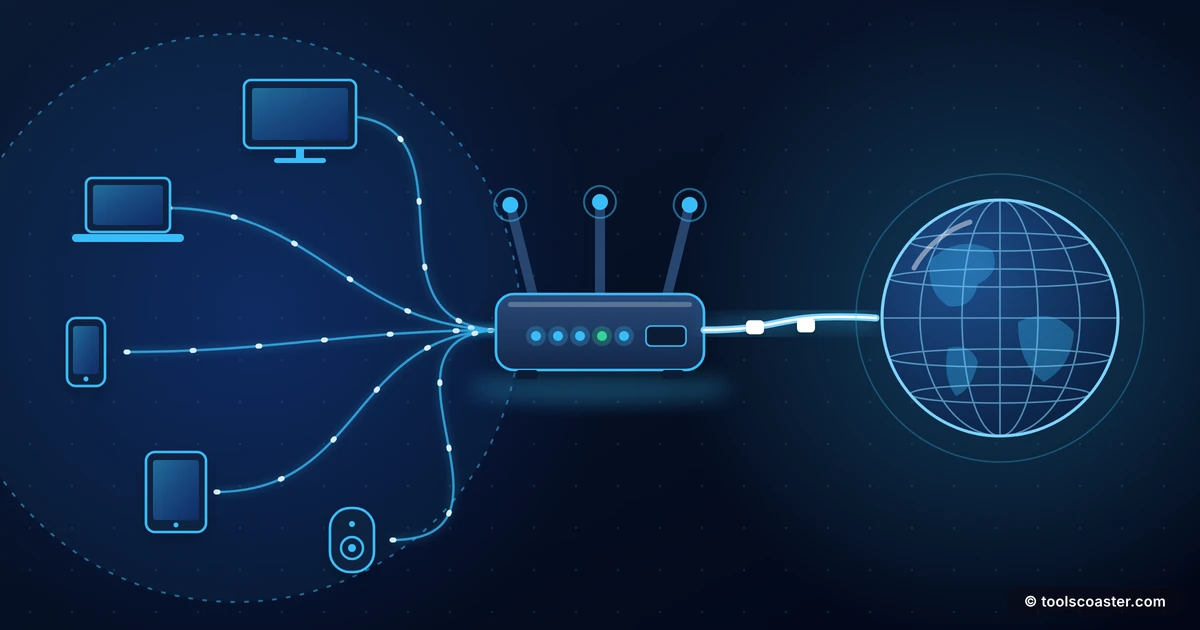
Someone once asked me, with real worry, why their laptop and their phone showed the "same IP address" when they checked online — had they been hacked? They had not. They had just bumped into one of networking's most useful tricks: an entire home full of devices sharing a single public address, courtesy of something called NAT. Once you understand it, a lot of confusing networking behaviour suddenly makes sense.
Here is the plain-English version of public versus private IP addresses, and the quiet translation layer that connects them.
Two kinds of address
Every device on a network needs an IP address to send and receive data. But there are two distinct worlds these addresses live in.
- Public IP addresses are globally unique and routable across the internet. Your home gets one from your internet provider, and it is how the wider internet finds you.
- Private IP addresses are used inside local networks — your home or office — and are deliberately not routable on the public internet. Your laptop, phone, TV and printer each get one so they can talk to each other and the router.
That split is why your phone and laptop can show the same public IP: when you check "what is my IP" online, you are seeing your home's single public address, which every device shares to reach the internet. Internally, each device still has its own distinct private address.
The reserved private ranges
Certain IP ranges are set aside exclusively for private use. You will recognise them once you know to look:
- 10.0.0.0 – 10.255.255.255 (a large range, common in businesses)
- 172.16.0.0 – 172.31.255.255 (a medium range)
- 192.168.0.0 – 192.168.255.255 (the familiar home-router range)
If you have ever seen an address like 192.168.1.5, that is a private IP handed out by your router. These ranges are reserved so that everyone can reuse them internally without conflict. There are millions of home networks all using 192.168.1.x, and that is fine precisely because those addresses never travel out onto the public internet. An IP address calculator can show you which range an address belongs to and what network it sits in.
NAT: the translator in your router
So if your devices use private addresses that cannot cross the internet, how do they load a web page? The answer is Network Address Translation (NAT), and your router performs it continuously without you ever noticing.
Here is the idea. When your laptop (192.168.1.5) requests a web page, the router rewrites the outgoing packet so it appears to come from your public IP. The response comes back to that public IP, and the router remembers which internal device asked, so it rewrites the reply and delivers it to your laptop. It keeps a table mapping internal requests to external responses, juggling dozens of devices through one public address simultaneously.
That is the whole magic: NAT lets a houseful of devices share a single public IP, translating addresses on the way out and back. It also, as a side effect, acts as a basic barrier — unsolicited traffic from the internet has no entry in the table, so it has nowhere to go by default.
A quick worked example
Picture three devices — a laptop at 192.168.1.5, a phone at 192.168.1.6, a TV at 192.168.1.7 — all behind one public IP, say 203.0.113.9. Each opens a different website. The router stamps all three outgoing requests with 203.0.113.9 but logs which internal device and port each belongs to. When three replies arrive, it reads its table and routes each one back to the right device. To the websites, it all looked like one address; inside the house, everyone got their own page.
Why private IPs cannot work on the internet
It is worth being clear that this is by design, not a limitation. Because the private ranges are reused on millions of networks, they are meaningless as global destinations — if you tried to send data to 192.168.1.5 across the internet, which of the millions of devices with that address would you mean? Routers on the public internet are configured to drop traffic to these ranges entirely. To reach the outside world, private-addressed devices must go through a public IP via NAT.
Why this matters in practice
Understanding this split explains a lot of everyday networking.
- Why port forwarding exists. To let outside traffic reach a specific internal device (a game server, a security camera), you tell the router to map an incoming port to that private address — manually punching a hole in NAT.
- Why your public IP can change. Most home connections get a dynamic public IP that your provider may rotate, which is why remote-access setups often need dynamic DNS.
- Why IPv4 lasted so long. NAT dramatically slowed the exhaustion of the limited IPv4 address pool by letting whole networks hide behind one address. IPv6, with its vast address space, reduces the need for NAT.
- Why "what's my IP" shows one address. It is reporting your shared public IP, not your device's private one.
The takeaway
Public and private IPs divide the addressing world into "inside" and "outside", and NAT is the ever-present translator that joins them. Your devices each hold a private address for local conversation, and share one public address — through NAT — to reach the internet. No hacking involved, just elegant engineering that has quietly held the internet together for decades. Next time your phone and laptop show the same IP, you will know exactly why.
Frequently Asked Questions
What is a private IP address?
Private IPs (like 192.168.x.x, 10.x.x.x and 172.16–31.x.x) are reserved for internal networks and aren't routable on the public internet. Your home devices use them to talk to each other.
What does NAT do?
Network Address Translation lets many devices on private IPs share a single public IP. Your router rewrites addresses on the way out and back, so the whole house browses through one public address.
Why don't private IPs work on the internet?
They're deliberately non-routable — reserved so anyone can reuse them internally without conflicts. Traffic to the wider internet must go through a public IP via NAT.
Explore 500+ Free Online Tools
No sign-up. No cost. Forever free — for developers, writers & creators.