 css
cssFlexbox vs CSS Grid: Which Layout Should You Use?
"Should I use Flexbox or Grid?" is probably the question I have answered most often for developers learning modern CSS, and it usually comes with a note of anxiety — as if picking wrong will break everything. It will not. Flexbox and CSS Grid are not rivals competing for the same job; they are two tools designed for two different shapes of problem. Once that clicks, the choice becomes obvious almost every time.
Here is a clear way to think about when to reach for each, with a simple rule you can rely on.
The one-line rule
If you remember nothing else, remember this:
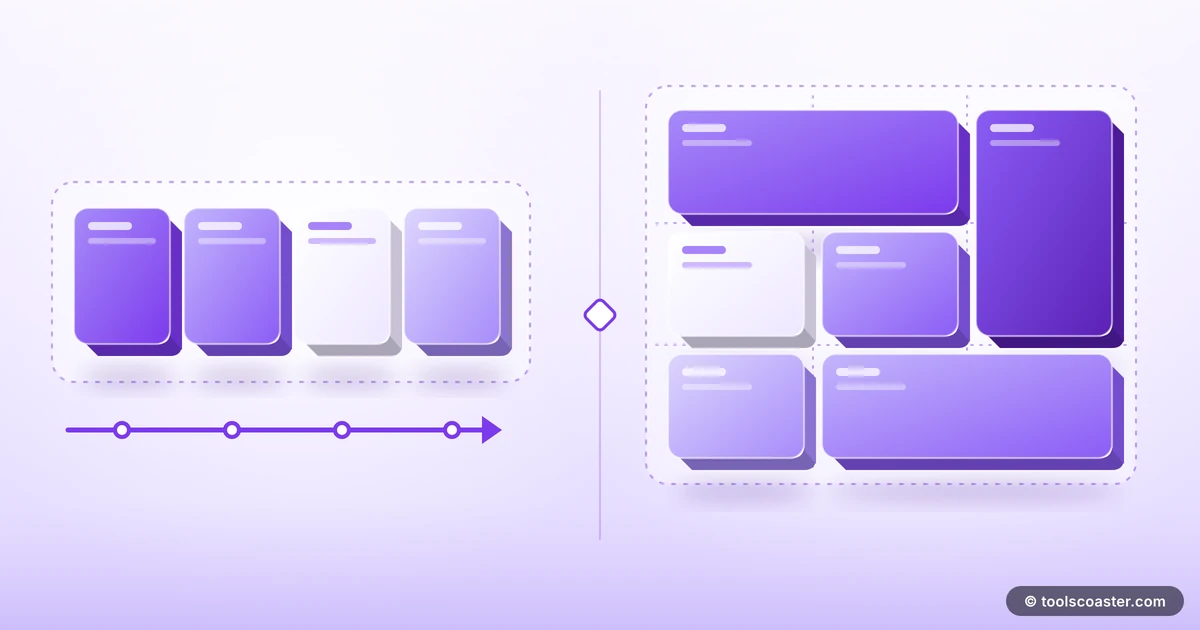
Flexbox is for one dimension. Grid is for two.
Flexbox lays things out along a single axis — a row or a column. CSS Grid lays things out along two axes at once — rows and columns together. That single distinction answers the majority of "which one?" questions before you even look at the details.
When Flexbox is the right tool
Flexbox shines when you have a set of items that should flow in one direction and share space intelligently. Think of a line of things that needs to align, distribute, or wrap.
Classic Flexbox jobs:
- Navigation bars — logo on the left, links on the right, evenly spaced.
- Button groups — a row of buttons that stays aligned.
- Centring — vertically and horizontally centring an element, the problem Flexbox famously made easy.
- Card toolbars — an icon, a title and an action spread across a single row.
Its strength is distributing space along that one axis. Properties like justify-content (spacing along the main axis) and align-items (alignment on the cross axis) let you position items precisely without fiddly margins. If your layout is essentially "a row of things" or "a column of things", Flexbox is almost certainly your answer. A flexbox generator lets you experiment with these properties visually and copy the resulting CSS.
When CSS Grid is the right tool
Grid is built for overall structure — laying out a page or a component in rows and columns simultaneously, where you care about alignment in both directions at once.
Classic Grid jobs:
- Page layouts — header, sidebar, main content and footer arranged in a defined structure.
- Image galleries — a true grid of items aligned in both rows and columns.
- Dashboard layouts — cards of varying sizes placed into a defined matrix.
- Any design where items must line up vertically and horizontally together.
Grid's superpower is that you define the structure explicitly — "three columns, two rows, this item spans two columns" — and the browser places everything accordingly. Trying to force a two-dimensional layout out of Flexbox leads to brittle nested containers; Grid handles it natively and cleanly.
They work best together
Here is the insight that graduates you from "which one?" to actually building things well: you usually use both, at different levels.
A common and robust pattern is to use Grid for the page skeleton — the big regions like header, sidebar, content, footer — and Flexbox inside each region to arrange its contents. Grid handles the two-dimensional macro layout; Flexbox handles the one-dimensional micro layout within each cell.
So a dashboard might use Grid to place six cards in a structured matrix, and each card internally uses Flexbox to line up its title, body and footer. They are not in competition at all — they are collaborators operating at different scales.
A quick worked example
Build a card grid: the container uses display: grid with three columns, so the cards align perfectly in rows and columns no matter how many there are. Inside each card, display: flex with justify-content: space-between pushes the title to the top and a button to the bottom. Grid solved "arrange the cards in a matrix"; Flexbox solved "arrange the contents of one card in a column". Two tools, two dimensions, one clean layout.
Is Grid replacing Flexbox?
A persistent myth says Grid is the newer, better tool that makes Flexbox obsolete. It is not true. They solve different problems and the specification authors intended them to coexist. Flexbox remains the simplest, most natural choice for one-dimensional arrangements — and reaching for Grid to lay out a simple navbar is overkill that adds complexity for no benefit.
Use the dimensionality of your problem to decide, not the age of the technology.
A decision checklist
When you are staring at a layout and unsure, run through this:
- Is it a single row or column of items? → Flexbox.
- Do I need to align things in rows and columns at once? → Grid.
- Am I laying out the overall page structure? → Grid.
- Am I arranging the contents inside one component? → usually Flexbox.
- Do I need items to span multiple rows or columns? → Grid.
Nine times out of ten that resolves it instantly.
The takeaway
Flexbox versus Grid is a false fight. Flexbox is your one-dimensional tool for rows and columns of items; Grid is your two-dimensional tool for structured layouts. The best real-world sites use Grid for the skeleton and Flexbox for the details, and the two complement each other beautifully. Learn the one-dimension/two-dimension rule, experiment with a flexbox generator to build intuition, and the anxiety behind the question disappears — you will just know which to use.
Frequently Asked Questions
What's the simple rule for Flexbox vs Grid?
Use Flexbox for one-dimensional layouts (a row or a column), and Grid for two-dimensional layouts (rows and columns together). Many pages use both — Grid for the page skeleton, Flexbox inside components.
Is CSS Grid replacing Flexbox?
No. They complement each other. Grid excels at overall page structure and complex alignment; Flexbox is perfect for distributing items in a single direction, like a navbar or button group.
Can I use Flexbox and Grid together?
Yes, and you usually should. A common pattern is a Grid layout for the main page regions and Flexbox within each region to arrange its contents.
Explore 500+ Free Online Tools
No sign-up. No cost. Forever free — for developers, writers & creators.